In Power BI a retail calendar replaces the ordinary date table. That has one consequence most teams discover late: the built-in time intelligence functions stop being correct, and every year-on-year measure has to be written by hand.
What a 4-5-4 Retail Calendar Is
The National Retail Federation publishes the calendar as a voluntary industry guide, derived in the 1930s. The point of it is comparability: four-week and five-week months hold the same number of Saturdays and Sundays from one year to the next, and holidays stay in the same week. Weekends carry a disproportionate share of retail sales, so under an ordinary calendar a month with five Saturdays looks like growth that never happened.
| Quarter | Months | Weeks |
|---|---|---|
| Q1 | February, March, April | 4 + 5 + 4 = 13 |
| Q2 | May, June, July | 4 + 5 + 4 = 13 |
| Q3 | August, September, October | 4 + 5 + 4 = 13 |
| Q4 | November, December, January | 4 + 5 + 4 = 13 |
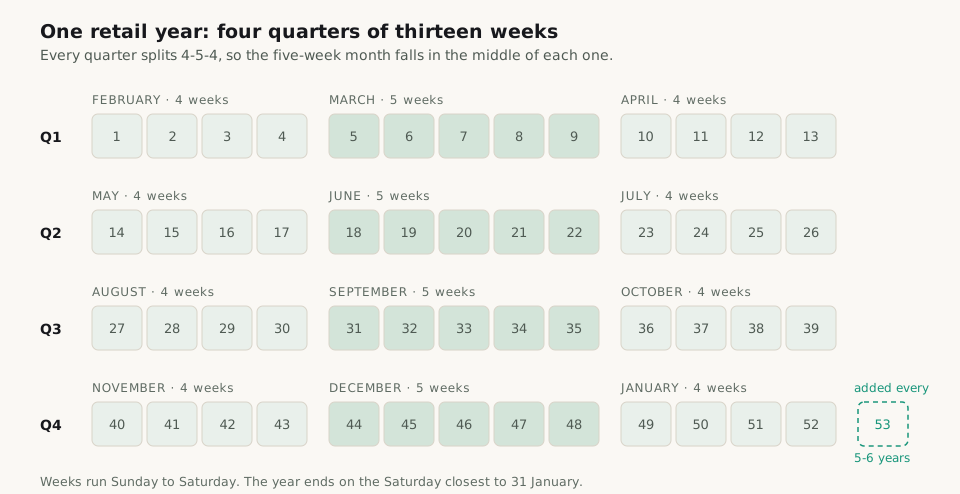
Retail months are defined by weeks rather than by dates, so a retail month starts and ends partway through a Gregorian one: retail March 2026 runs from 1 March to 4 April. This is what confuses everyone outside the planning team for their first season, and it is why the calendar table has to carry a readable period label and not only a number.
The Columns a Retail Calendar Table Needs
| Column | What it is for |
|---|---|
| Date | One row per day, contiguous. Power BI requires it before the table can be marked as a date table |
| Week Index | A continuous integer across the whole calendar, not restarting each year. Every year-on-year measure is an offset on this column |
| Retail Year | The year the week belongs to, which is not the Gregorian year of the date |
| Week of Year | 1 to 52, or 53 |
| Period and Period Name | 1 to 12, plus a label such as Mar 26. Numbers sort, labels get read |
| Quarter | 1 to 4 |
| Week of Quarter | 1 to 13, the column the 4-5-4 split is derived from |
| LY Week Index | The week index this week compares with. Usually Week Index minus 52, but not across a 53-week year |
| Is Current Week | A flag, so the report opens on the right week without a slicer |
Without those two index columns every comparison measure has to work out the alignment for itself, and each one ends up doing it slightly differently.
Building the 4-5-4 Calendar Table in DAX
The arithmetic is integer division on the week index, which is why the table is worth generating rather than maintaining by hand.
Retail Calendar =
VAR FirstDay = DATE ( 2021, 1, 31 )   -- the Sunday the earliest retail year starts
VAR LastDay = DATE ( 2028, 1, 29 )    -- the Saturday the latest one ends
VAR Base =
    ADDCOLUMNS (
        CALENDAR ( FirstDay, LastDay ),
        "Week Index", QUOTIENT ( DATEDIFF ( FirstDay, [Date], DAY ), 7 )
    )
VAR WithYear =
    ADDCOLUMNS (
        Base,
        "Retail Year", YEAR ( FirstDay ) + QUOTIENT ( [Week Index], 52 ),
        "Week of Year", MOD ( [Week Index], 52 ) + 1
    )
VAR WithQuarter =
    ADDCOLUMNS (
        WithYear,
        "Quarter", QUOTIENT ( [Week of Year] - 1, 13 ) + 1,
        "Week of Quarter", MOD ( [Week of Year] - 1, 13 ) + 1
    )
RETURN
    ADDCOLUMNS (
        WithQuarter,
        "Period",
            ( [Quarter] - 1 ) * 3
                + IF ( [Week of Quarter] <= 4, 1, IF ( [Week of Quarter] <= 9, 2, 3 ) ),
        "LY Week Index", [Week Index] - 52
)The 4-5-4 split is the one line in the middle: weeks 1 to 4 of a quarter belong to its first month, 5 to 9 to the second, 10 to 13 to the third.
Then mark it as the date table in the model. Power BI requires contiguous dates with no gaps, which CALENDAR guarantees; without the marking, the relationship behaves as an ordinary integer join and some visuals quietly drop the dates with no sales.
This version assumes every retail year has 52 weeks. That holds for a run of years and then does not. When the range crosses a 53-week year, the year boundaries have to come from data rather than from division: a two-column table of retail year and its first day, with the same arithmetic running per year. Build it in Power Query or keep it as a small maintained table. It is a dozen rows and it is worth owning.
Why Power BI Time Intelligence Does Not Work on a Retail Calendar
DATESYTD, SAMEPERIODLASTYEAR, TOTALYTD and the rest assume a Gregorian structure: that every day of a month belongs to the same quarter in every year, and that the same day and month last year is the comparable period. On a week-based calendar neither assumption holds. SQLBI's analysis of week-based time intelligence gives the clean example, that 1 and 2 January 2011 belong to week 52 of 2010, and notes that the optional year-end argument of DATESYTD cannot repair it, because the period boundaries themselves move between years.
So the measures are written against the calendar's own columns instead: filter on Retail Year, Period or Week of Year, plus a cap on the week index.
Sales RYTD =
VAR LastWeek = MAX ( 'Retail Calendar'[Week Index] )
VAR ThisYear = SELECTEDVALUE ( 'Retail Calendar'[Retail Year] )
RETURN
    IF (
        NOT ISBLANK ( ThisYear ),
        CALCULATE (
            [Sales Value],
            REMOVEFILTERS ( 'Retail Calendar' ),
            'Retail Calendar'[Retail Year] = ThisYear,
            'Retail Calendar'[Week Index] <= LastWeek
        )
)The IF around it is deliberate. On a total row where several retail years are in context there is no single year to run to date, and a blank is a more honest answer than a number nobody can reconstruct.
Comparing With Last Year on a Retail Calendar
With LY Week Index in the table, last year is a lookup rather than a date calculation.
Sales LY =
VAR LastYearWeeks =
    TREATAS (
        SELECTCOLUMNS (
            VALUES ( 'Retail Calendar'[Week Index] ),
            "@Week", 'Retail Calendar'[LY Week Index]
        ),
        'Retail Calendar'[Week Index]
    )
RETURN
    CALCULATE (
        [Sales Value],
        REMOVEFILTERS ( 'Retail Calendar' ),
        LastYearWeeks
)Reading the column rather than subtracting 52 inside the measure is the whole point: the correction for a 53-week year then lives in one place, and every measure built on it inherits the fix.
What the 53rd Week Does to a Retail Calendar
A 52-week year is 364 days, so a day accumulates every year and, with leap years, the calendar drifts. The fix is a 53rd week added roughly every five or six years. NRF's rule is to add one when four or more days remain in January after week 52, and it lists 2006, 2012, 2017 and 2023 as 53-week years.
Two things break at that boundary, both quietly. Week alignment goes first: week index minus 52 lands a week off, so every year-on-year figure is wrong by one week for a full year. Nothing errors, the numbers simply stop meaning what the label says. Then the totals: a 53-week year holds an extra week of trade, so comparing it with a 52-week year shows growth that is a week of calendar rather than a week of demand.
NRF's answer to the first is restatement: shift each week back by one and ignore the first week of the 53-week year, which keeps the holidays aligned. In the model that is exactly what the LY Week Index column is for. Write the restated mapping into it once, for the two years either side of the boundary, and no measure needs a special case.
For the second there is no arithmetic fix, only disclosure: a 53-week year gets reported both ways, 53 against 52 for the statutory numbers and 52 against 52 for the trading read, and each page says which one it is showing.
Mistakes in Retail Calendar Tables
- Restarting the week number each year and comparing on it. Week 1 of one year and week 1 of the next sit a different distance from the season start when a 53rd week falls between them. Compare on a continuous index.
- Using the built-in time intelligence anyway. It returns numbers, which is worse than returning errors.
- Leaving the table unmarked as a date table. Relationships still work, so nothing looks broken until a visual drops the weeks with no sales.
- Deriving the retail year by division when the range crosses a 53-week year. The arithmetic has no way to know, so the boundary has to come from data.
- Showing the period label without the period number. Mar 26 then sorts between Jul 26 and May 26; sort the label by the number.